

Ask an AI assistant to explain an overdue invoice and you may get a helpful paragraph. Ask an AI agent to investigate it and the system might open the invoice, check a purchase order, compare the delivery record and prepare a message to the supplier. Whether it can actually send that message depends on the tools and permissions you've given it.
That ability to move through a task is what makes agents useful, and what makes their mistakes more consequential. A bad answer can mislead you. A bad action can change a record, share private information or spend money. Understanding an agent starts with understanding what happens between your request and the result.
What makes a system an AI agent?
There isn't one definition used by every company. In this guide, an agent means a system that uses an AI model to choose some of the steps and tools needed to work toward a goal. Its software passes results back to the model, allowing it to decide what to do next.
Anthropic's architectural distinction is useful: a workflow follows predefined code paths, while an agent lets the model direct more of the process. Both can use language models. Both can include human approval. Neither label tells you how reliable the finished product will be.
An agent usually combines a model, instructions, access to tools and software that runs the process. That surrounding software is sometimes called a harness. It handles practical jobs such as making tool calls, preserving task state, enforcing limits and deciding when execution ends.
The model's contribution is choosing or proposing actions from the options available. The surrounding system determines what actually runs. Calling something autonomous describes how much decision-making it has been given, rather than proving intelligence, judgment or independence from its operator.
Follow one task through the loop
Imagine a small business investigating a supplier's request for payment. This is a hypothetical example, not a demonstration of a particular product.
The user asks the agent to check whether an invoice matches the order and delivery. The agent searches an approved folder, finds the invoice and requests the corresponding purchase order through a tool. The application returns the record. The model compares the amounts, notices a missing delivery confirmation and searches for that evidence next.
If the confirmation is unavailable, a sensible result is a flagged exception with links to the records it found. The agent can draft a question for the supplier. A separate approval rule can prevent it from sending the message or paying the invoice until someone reviews the details.
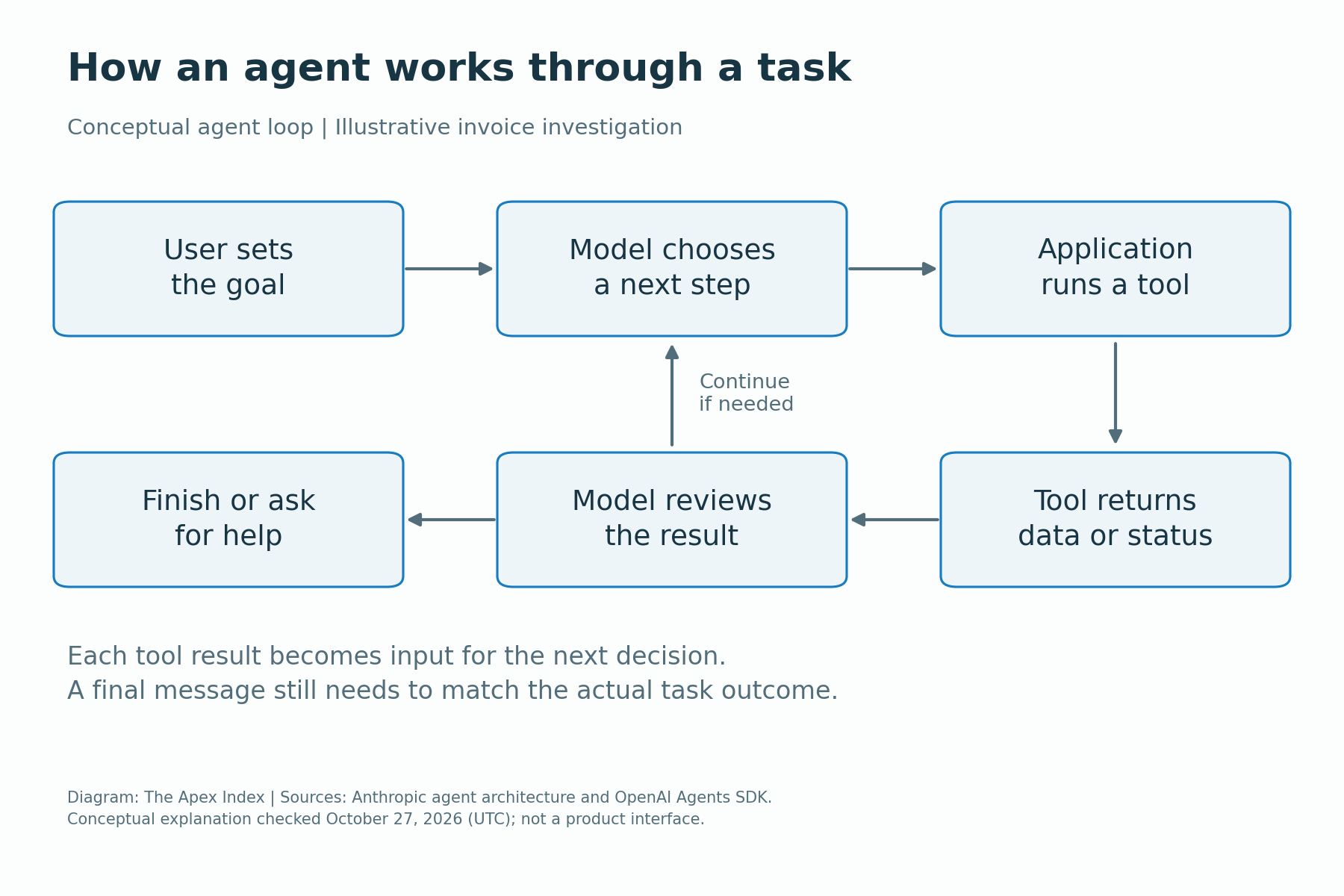
OpenAI's agent-runner documentation describes this repeated pattern: call the model, execute requested tools, append their results and run the model again, unless the run finishes or hits a limit. A successful tool request is one step in that process. It doesn't establish that the overall business task was completed correctly.
Tools turn a suggestion into an action
A tool can be a document search, calculator, database query or connection to another service. The model supplies proposed inputs, such as an invoice number. Software validates those inputs and calls the relevant service using the access available to the application.
This is why two agents using the same underlying model can have very different capabilities. One may only search documents. Another may create support tickets. A third may have permission to issue refunds. You need to inspect the tools and their access, not infer capability from the model's name.
Good tool design makes errors easier to catch. A tool named for one task, with clearly defined fields and allowed values, gives the system less room to act outside that task than a broad connection that accepts arbitrary commands. The service should still check whether the requested operation is allowed.
The returned result also matters. An application needs to distinguish a successful update from a timeout, rejected request or incomplete search. Otherwise, a confident final message can conceal a tool failure. For consequential work, check the changed record or a confirmation from the connected service.
When a fixed workflow is the better choice
Some jobs already have a clear sequence. An expense claim might need a receipt, a matching employee record, a spending-policy check and a manager's approval. A conventional workflow can enforce those steps even if a model helps read the receipt or categorize the expense.
Agents become more useful when the route genuinely varies. Investigating why a delivery failed may involve different systems and follow-up questions each time. The model can choose where to look after seeing the previous result, instead of following the same checklist blindly.
That flexibility adds uncertainty. A longer process can spend time on the wrong lead, repeat searches or interpret an exception badly. Before adding an agent, ask whether ordinary software, a search interface or one carefully designed model request would solve the problem with less complexity.
You can also combine approaches. A fixed workflow can give an agent a bounded investigation, then require a human decision before the next stage. There is no requirement to hand over the whole job just because one part benefits from flexible tool use.
Give it the information it actually needs
A model can only use information that reaches its working context or is retrieved through its tools. Access to a document store doesn't mean every document has been read, and a search can miss the relevant record. Ask which sources were checked and whether the result is complete.
Persistent memory is a separate feature. Applications may store preferences, summaries or task records and retrieve them later. That does not make stored material correct. A saved supplier address can become outdated, and an earlier mistaken conclusion can be carried into another task.
Treat important facts according to their source and date. For the invoice example, the current purchase order and delivery record should carry more weight than an old chat summary. If the information conflicts, the system needs a way to surface that conflict rather than quietly choose whichever text appears easiest to use.
Set permissions before handing over the task
Start with what the system must read, then decide what it may change. Reading an invoice, drafting an email, sending it and paying it are separate permissions. A useful setup can allow the first two while requiring approval for the others.
Those restrictions should be enforced in the connected service or application code. A sentence telling the model to be careful is guidance, not an access control. If a database account can delete records, a mistaken tool request may still have that power.
The same principle applies to spending limits and recipients. A payment system can restrict permitted accounts and amounts. A messaging tool can require a specific recipient to be approved. These checks reduce the consequences of a bad model decision without requiring the model to recognize every possible mistake itself.
For approval to mean anything, show the actual action: which record will change, who will receive a message, what information is attached and how much money is involved. A vague prompt to continue makes it difficult for a person to judge the consequences.
Why reading a webpage can create a security problem
An agent searching the web may encounter text that tries to redirect it. A document could tell the model to ignore its task or send private data elsewhere. When outside content is treated as an instruction, the system can be exposed to indirect prompt injection.
The problem is that the agent may need to read an untrusted source to do legitimate work. A supplier's document is evidence about an invoice; it should not gain authority to change the agent's rules or its access to a company's files.
OWASP's guidance identifies excessive functionality, permissions and autonomy as causes of damaging actions. Its recommendations include narrower tools, minimum necessary permissions, independent authorization and human approval for high-impact operations.
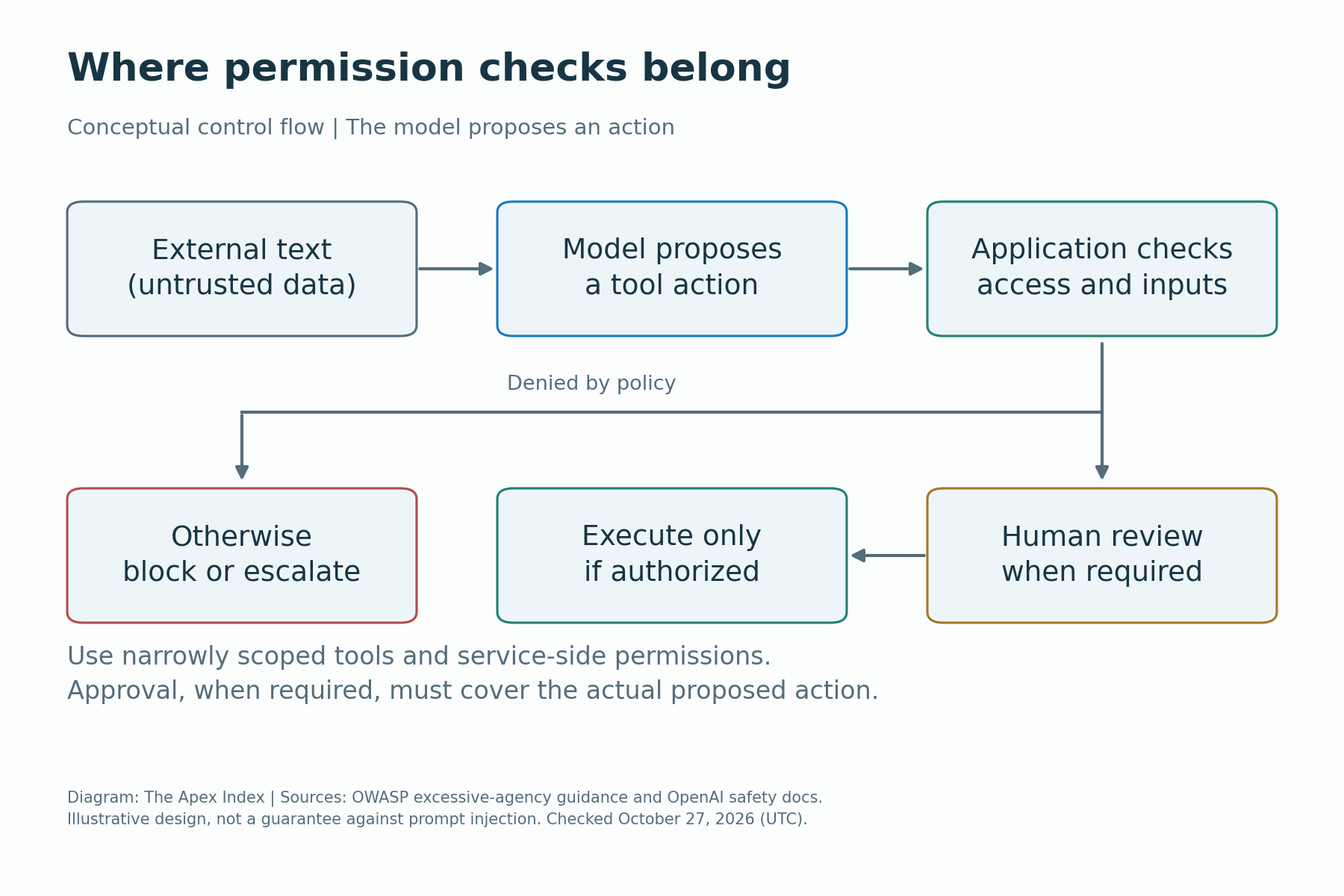
No single filter makes all outside content safe. Restricting access, separating untrusted text from controlling instructions, validating tool inputs and monitoring execution work together. A sandbox can limit actions within an environment, but any external accounts or network services it can reach still need their own restrictions.
Test completion, not how convincing the answer sounds
Before using an agent on real work, give it representative tasks with outcomes you can check. Include straightforward cases and exceptions: a missing attachment, duplicate invoice, ambiguous instruction or service that returns an error. Decide in advance what a correct response would look like.
For the invoice investigation, success could mean locating the right records, identifying a mismatch and stopping before an unauthorized payment. Producing a polished explanation while checking the wrong supplier should count as a failure, even if the final answer reads beautifully.
Measure the whole task. Record whether it finished correctly, needed intervention, made an unauthorized attempt or left a misleading status. Keep the tool history and relevant outputs so someone can trace a mistake back to the step that caused it.
Avoid turning one good demonstration into a reliability claim. The cases you test, the available data and the allowed tools shape the result. Run a controlled pilot against the work your team actually receives, and compare the effort saved with the time spent checking and fixing its output.
Background work needs somewhere to run
An agent can continue while you're away only if the product supports that behavior and its execution environment remains available. Closing a browser, putting a laptop to sleep and leaving a hosted task running are different situations. Check where the process lives and what stops it.
Anthropic's Managed Agents documentation, for example, describes managed infrastructure for long-running and asynchronous tasks. Its architecture separates the model-running software, execution environments and a persistent event history. That is a product capability, not a property every AI chat automatically has.
For your own task, ask how you'll know whether it finished, paused for approval or failed. A reliable service needs a status you can inspect, a way to interrupt work and a record of completed actions. If a connection fails, check what happened before pressing retry.
A timeout needs particular care. The connected service may have completed an action even though the agent never received confirmation. Before repeating a payment or message, check the destination system or use a request identifier that prevents the same operation from being performed twice. Otherwise, retrying can create a second problem while trying to fix the first.
Count the cost of the completed job
A single request can trigger several model calls, searches and tool executions. Costs may include model usage, paid data, computing time and the connected services themselves. A cheaper model call doesn't necessarily produce a cheaper completed task if it takes many more attempts.
Human review is another cost. If every supposedly automated report needs extensive checking, include that time when judging the benefit. It may still be worthwhile, especially if collecting the evidence was slow, but the saving should be measured rather than assumed.
Set limits on steps, runtime and spending, and define what happens when a limit is reached. The useful outcome is a clear partial result or escalation. Repeated retries that quietly consume resources can make an ordinary failure unnecessarily expensive.
Start with a task you can safely inspect
Choose a narrow job with a visible result, such as comparing documents and drafting a report. Use a test copy or restricted dataset where possible. Keep sending messages, changing important records and spending money behind explicit approval until you've tested those actions properly.
Write down the goal, permitted sources, actions that are allowed and conditions that require a person. Ask for evidence with the output, then verify a sample against the underlying records. Expand access only when a particular task needs it and its results justify the change.
Also decide who owns mistakes. Someone must be able to revoke access, stop a run, contact an affected customer and correct a changed record. An agent's ability to produce work doesn't remove the need for a person or organization responsible for operating it.
Agent tools and hosting arrangements change quickly. Check the current product documentation for supported actions, data handling, usage limits and background execution before relying on a feature. The capabilities and security guidance in this guide were checked on October 27, 2026 (UTC).