
The hardest part of crypto security is that several things need protecting at once. Your exchange login, email account, wallet recovery backup and transaction approvals have different jobs. Securing one does not automatically secure the others.
The aim here is a routine you can actually follow. You should know where most of your money sits, what you are willing to connect to a new app, and how you would respond if an account or device started behaving strangely. No setup removes every risk, including failures inside a company holding your assets.
These ten measures cover exchange accounts and self-custody wallets for a global audience. Product settings and documentation were checked on October 30, 2026, in UTC. Specific provider examples illustrate a feature; availability, recovery processes and legal protections vary by service and country.
1. Choose custody deliberately and limit what each place holds
Start by listing where your assets actually are. An exchange balance leaves you dependent on that business's custody and withdrawal systems. A personal wallet gives you responsibility for recovery credentials and approvals. Money deposited into a lending protocol is exposed to that protocol's contracts as well.
Decide what each location is for. Funds needed for active trading may belong in a different place from assets you intend to leave untouched. Set a limit that reflects what a compromise or prolonged withdrawal pause would mean for you. There is no universal safe amount or percentage.
Before using a provider, check the legal entity serving your country, its support channels, withdrawal rules and the security settings you can enable. Learn what it says about custody and liability rather than assume its size makes every loss refundable. Public promises and contractual protections are different things.
For a new destination, a small test transfer can confirm that the address, network and any required memo work together. It cannot prove an exchange is solvent or that a protocol is free of bugs. Treat it as a routing check, and verify the details again before the larger transfer.
2. Protect your email and exchange logins with phishing-resistant access
Give your primary email account and each exchange a different, long password. A reputable password manager can generate and store them, reducing the temptation to reuse one memorable string. Protect the manager's own access and recovery method carefully.
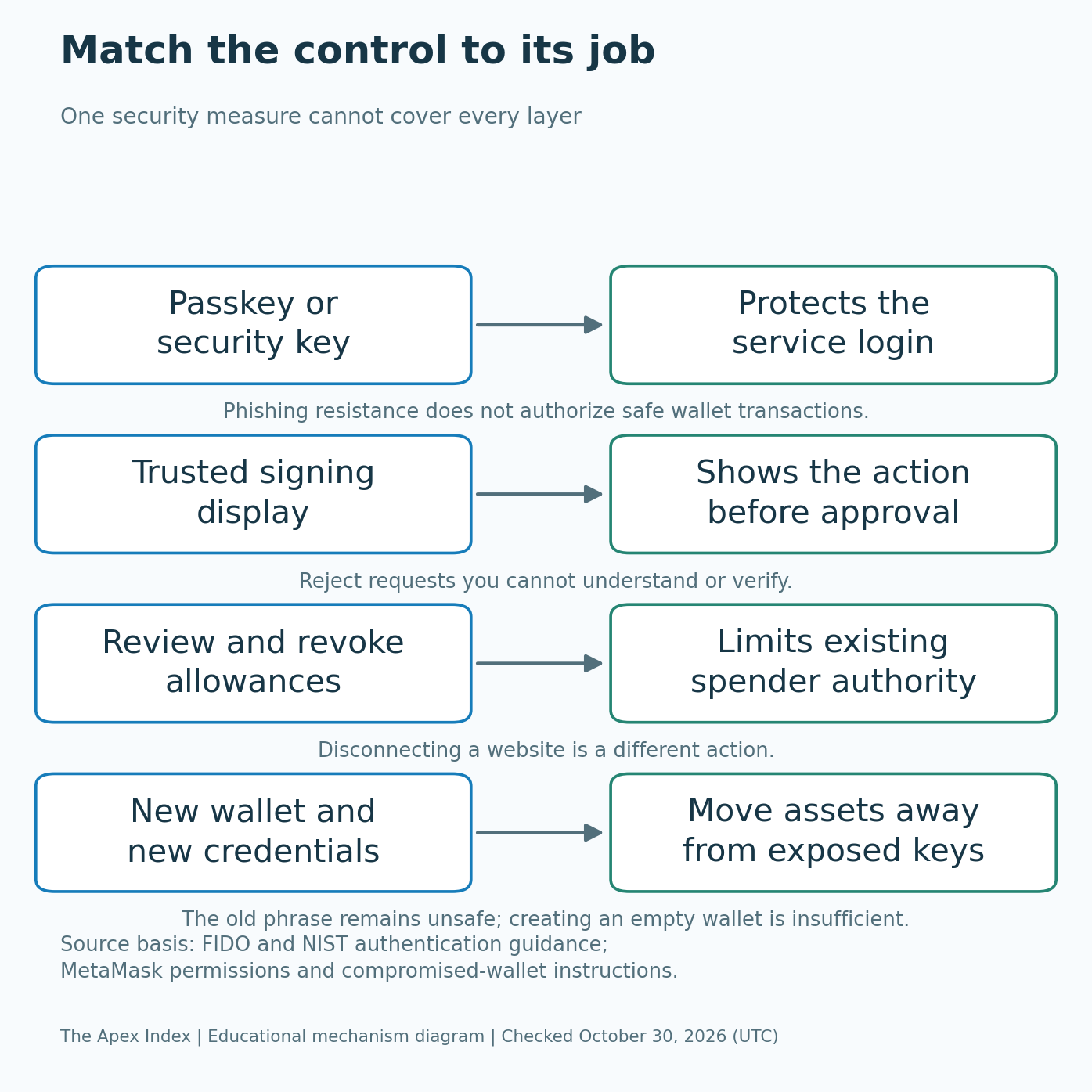
Where supported, prefer a passkey or physical security key over a code you type into a website. FIDO's passkey explanation describes authentication designed to resist phishing by binding the login to the genuine service. Check the provider's setup instructions and register a recovery option you can keep secure.
An authenticator app can still improve protection where stronger options are unavailable. Its changing codes can be stolen through a convincing fake login, however. U.S. NIST guidance explicitly says one-time-password authentication is not phishing-resistant. Text-message codes also depend on the security of your telephone account.
Secure the email account used for password resets before treating the exchange as protected. Review unfamiliar sessions, remove unused recovery methods and keep backup login codes somewhere safe. A passkey does not stop malicious software from abusing an already authenticated device, so account protection still depends on device hygiene.
3. Set up your signing device without importing somebody else's secrets
For substantial self-custody holdings, consider a hardware wallet that fits the networks and transactions you use. Its purpose is to isolate signing keys from the everyday computer or phone. You still need to understand its display, recovery system and software support.
Buy through the manufacturer or a channel it recognizes. Follow the maker's authenticity checks and initialization instructions. Reject a device supplied with a completed recovery phrase or instructions to use somebody else's backup. The recovery credentials should come from your own trusted setup process.
Do not turn a previously exposed software-wallet phrase into “cold storage” by entering it into new hardware. That recreates credentials which could already have been copied. Generate new recovery credentials for a fresh long-term wallet, then transfer assets through carefully verified transactions.
Practice a small receive-and-send operation before relying on the device for important holdings. Check the destination and transaction details on its trusted display when supported. A genuine device can protect its key while you still approve a harmful transaction, so buying hardware does not replace checking what appears on the screen.
4. Make an offline recovery backup you can actually use
Record the recovery information required by your wallet, accurately and in order. A phrase, device PIN, login password and optional wallet passphrase are different credentials. Confusing them can make a backup useless when you need it.
For an ordinary phrase-based hardware wallet, keep the recovery phrase out of photographs, email drafts, cloud notes and chats. A physical backup needs protection against theft as well as damage. Paper can burn or get wet; a metal backup also needs secure storage. Choose a method you can maintain rather than buying a product and assuming the problem is solved. Store the backup separately from the device when practical, so one theft or accident does not take both.
Use the manufacturer's trusted backup-check process, where available. Do not test recovery by typing the phrase into an online “validator.” Support staff, investment advisers and people offering to secure your wallet do not need those words.
If your wallet uses an extra recovery passphrase, understand how it works before enabling it. A different passphrase can produce a different wallet, and a missing one can prevent recovery. Avoid inventing your own word substitutions, splitting scheme or handwritten encryption system that you have never successfully tested.
5. Read the permission before you sign it
Pause at the wallet prompt. Check the destination, network, token, amount and the action being authorized. Compare those details with what you intended to do, using the device's trusted display where possible. An attractive website cannot supply information missing from an unclear request.
A message saying “sign in” may be a legitimate login request. Other signatures can authorize a purchase, a token transfer, an allowance or an account permission. Paying no fee at the time does not make a signature harmless: another party may submit an authorization later.
If a wallet shows unreadable data or a warning you do not understand, decline and investigate through the project's established documentation. Transaction simulations and security warnings can help explain expected effects, but their scope and accuracy vary. They are additional checks, not promises that the site is safe.
Be especially careful with unexpected “verification,” “migration” or urgent account-repair requests. A successful small interaction earlier does not establish that a later request has the same permissions. Read each authorization on its own, and stop if it asks for authority unrelated to the task you came to perform.
6. Keep token permissions narrow and remove those you no longer need
For a standard ERC-20 token approval, check both the spender and the allowance. Approving a known app's actual contract is different from approving a new address presented by a fake page. Where practical, authorize the amount needed instead of granting unlimited access by default.
Make permission reviews part of your routine and repeat them after using unfamiliar applications. MetaMask's revocation guide explains why disconnecting a site does not remove an existing onchain allowance. Closing the browser or logging out leaves that separate authorization untouched.
Use a trusted wallet feature or the correct network explorer to inspect allowances. Confirm the network and spender before revoking anything. Revocation itself may require a transaction and a network fee, and fake approval-checking websites can request new harmful signatures.
Permissions differ by token and account design. Some signed authorizations, NFT operators and smart-account delegations need different checks from an ordinary token allowance. If you cannot identify what you granted, consult the wallet's official instructions. Revoking a spender does not fix a recovery phrase that someone else already knows.
7. Keep the device and the route to your wallet clean
Install wallet software from a verified developer listing reached through the project's official website. Check the developer identity and the destination after any redirect. Search advertisements, social profiles and app-store listings can imitate a familiar brand closely enough to catch a hurried user.
Keep the operating system, browser and wallet updated through their normal update channels. Remove browser extensions you do not need, particularly those allowed to read or change website content. A separate browser profile can reduce clutter, but it cannot isolate a wallet from malware controlling the whole computer.
Do not install a document viewer, meeting app, trading tool or “security patch” simply because a supposed recruiter, support agent or investment contact tells you to. Remote-access software can give another person a view of sensitive information and control over what you do next.
Bookmark important services after verifying their addresses independently. A padlock indicates an encrypted connection to that domain; it does not establish that the domain belongs to the business you intended to reach. A familiar face or voice in a video also does not authenticate an instruction to move money.
8. Separate long-term holdings from experiments and automated access
Keep a reserve wallet away from unfamiliar applications. Use a separate wallet with a limited balance for experimentation, and move assets back only through transactions you understand. This gives an unexpected approval or compromised app less to reach.
Understand what “separate” means in your setup. Two accounts derived from one recovery phrase may have separate token permissions, but exposure of that phrase can compromise both. Separate browser tabs offer no protection from that common recovery secret. Stronger separation requires an arrangement with genuinely different credentials and appropriate device security.
Review connections granted to trading bots, portfolio trackers and automated agents. Give read-only access when reading is all the service needs. Avoid transfer permissions unless there is a clear requirement, and restrict access by portfolio, address or network settings where the provider supports it.
Do not assume a key without withdrawal permission is harmless. It may still place trades. Exchange API behavior also varies: Coinbase Exchange documents a Transfer permission that can bypass two-factor authentication. That is why API credentials deserve their own permissions review rather than being treated like an ordinary password protected by the login screen.
9. Watch for unauthorized activity and know what your provider's promises cover
Enable account and withdrawal alerts where available. Read them through your established app or bookmarked website instead of following an unexpected message's link. Look for unfamiliar sessions, changed recovery details, new API keys and withdrawal addresses you did not add.
For personal wallets, inspect unfamiliar activity with the correct network explorer. Confirm whether an apparent outgoing transaction is a transfer, a contract interaction or a fee. A wallet's activity feed can simplify complex operations, so use the transaction record when the summary is unclear.
Keep a simple inventory of the networks, wallets and services holding your assets, without turning it into a file full of recovery secrets. This makes it easier to notice a missing position or determine which account an alert concerns. Sharing a device with other people also means agreeing on who can install software or approve prompts.
Read insurance and compensation claims closely. Coverage can depend on the event, the legal entity and the terms. A reserve report showing selected assets does not by itself establish all liabilities or promise immediate withdrawals. Match the claim to what it actually measures before using it to choose where your money belongs.
10. Prepare your response before something goes wrong
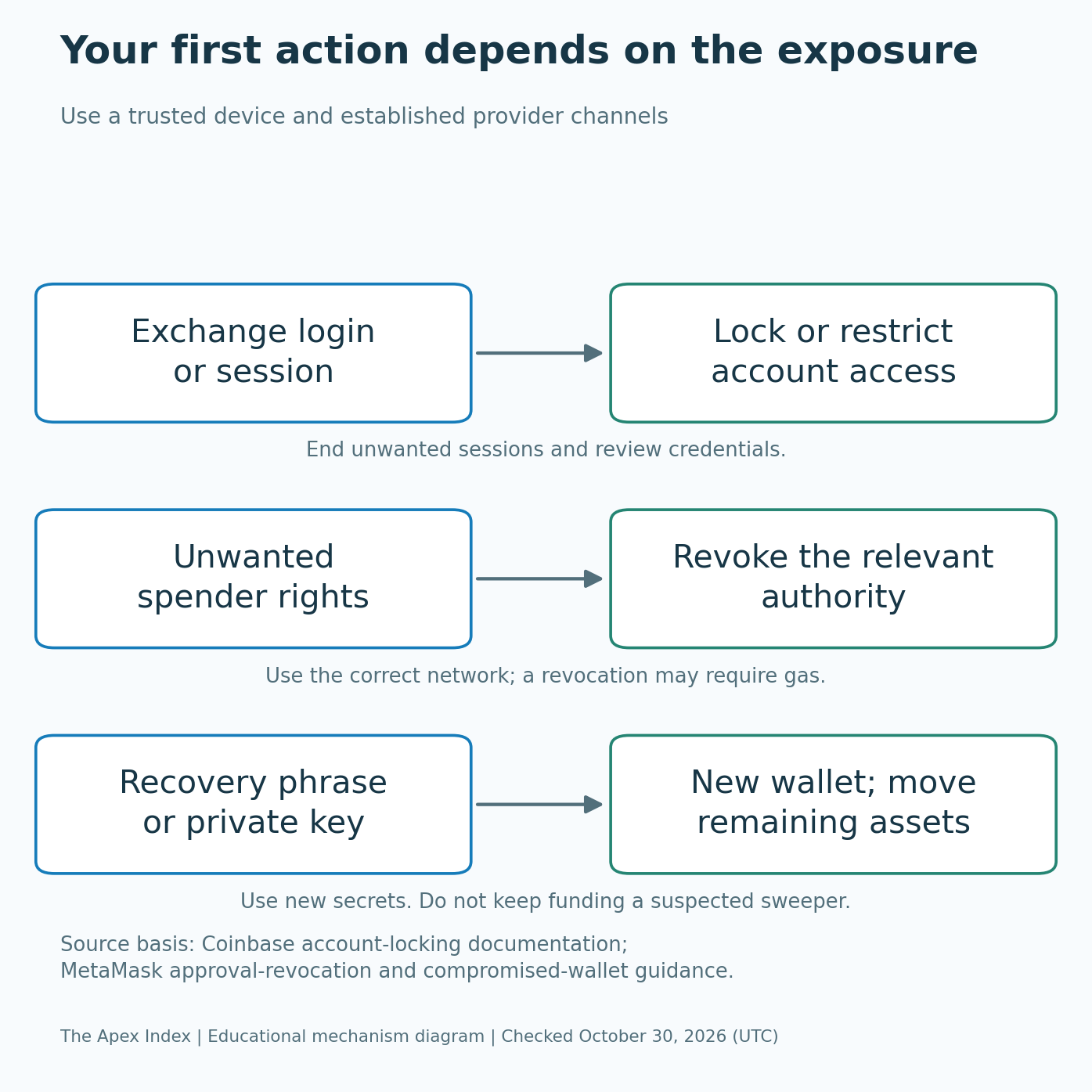
Write down how to reach your exchange's verified support and account-locking tools. Keep that information separately from recovery secrets. If an account is compromised, use a trusted device to secure the linked email, end unauthorized sessions and restrict access through the provider's official process.
For a wallet incident, first work out whether you exposed a recovery secret, approved a harmful spender or deposited into a compromised protocol. Those situations need different responses. If the phrase or key is exposed, create a genuinely new wallet on a trusted setup; another account under the same phrase is not a clean replacement.
MetaMask's compromised-wallet instructions warn against adding fee money when a sweeper is suspected. An automated thief can take fresh deposits before you rescue anything. Do not keep sending money into the same problem while following a stranger's rescue instructions.
Preserve transaction hashes, addresses, networks, messages and relevant dates, then contact the provider and local authorities. Reporting does not guarantee repayment, but it gives investigators usable information. Decline unsolicited recovery offers, requests for your phrase and demands for another payment to unlock supposedly recovered assets. A U.S. FBI warning describes this secondary scam; people outside the U.S. should also use their own local reporting channels.